The Notes to Play stage: the gold Notes to Play logo and Your Muse Captered above a grand piano, guitars and a microphone under warm spotlights

Your songwriting studio, wherever you go

Write a chord.
Hear the band.

Pick chords on the circle of fifths, write your lyrics underneath, and piano, guitar, bass and drums play it back. Instantly.

INSTALLS FROM YOUR BROWSER · WORKS OFFLINE · YOUR SONGS STAY ON YOUR DEVICE

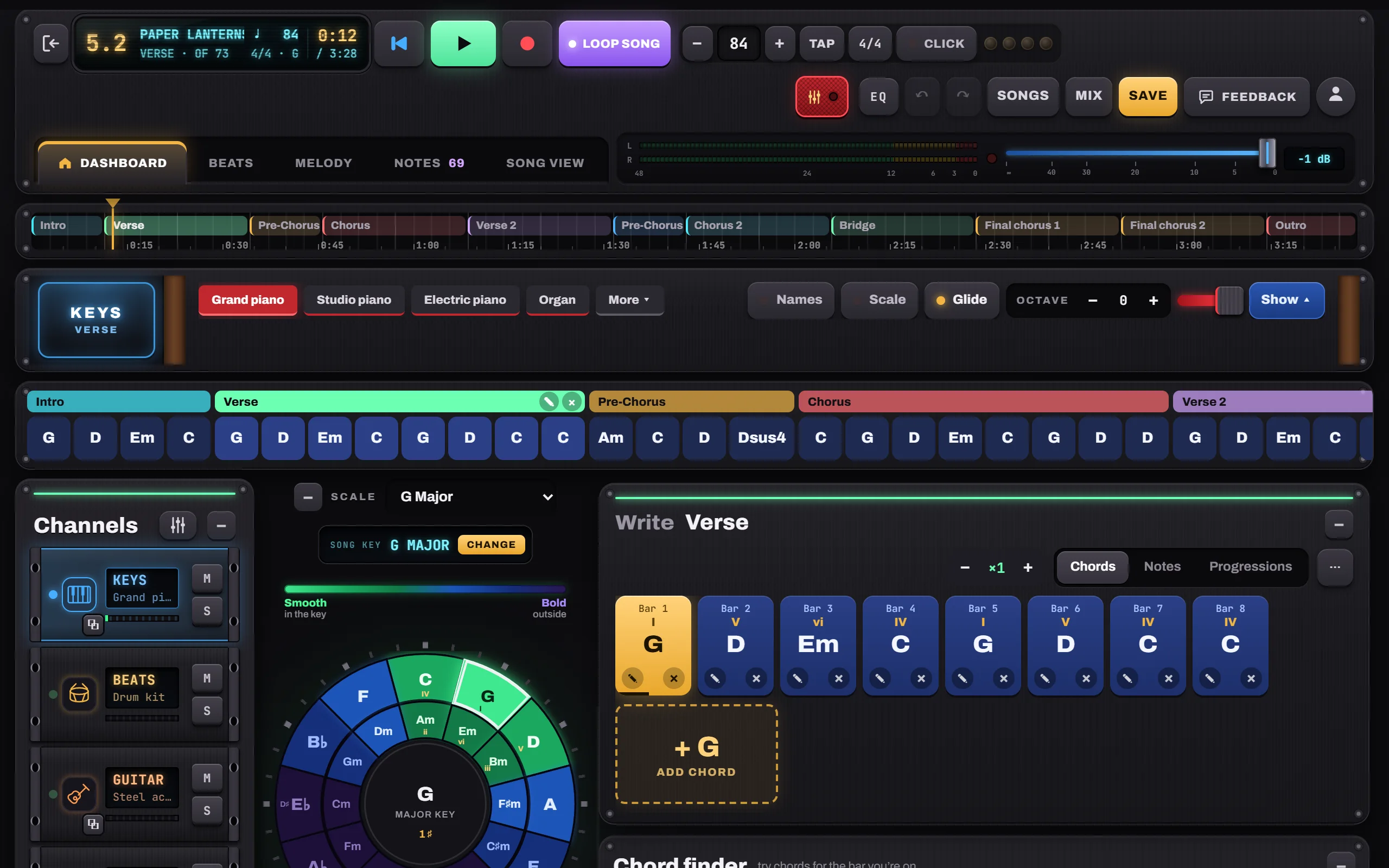
The Notes to Play dashboard: the song timeline, every bar of the song, the circle of fifths and the part being written

The chorus you hummed in the car deserves more than a voice memo. Give it chords, a band and a place to grow.

Write with chords

Every chord in reach. The right ones lit up.

Tap the circle of fifths to hear any chord. Your key glows green; bolder choices fade to blue and purple. Nothing goes into the song until you say so.

How to choose chords
The circle of fifths in Notes to Play, colored from green (in the key) to blue and purple (further away), with G major as the home chord
Chord finder

Stuck? Turn the dial.

The Chord finder ranks the chords most likely to come next, best first. Turn it, tap one, hear it in your song.

  • Suggestions follow the key and the bar you’re on
  • The Chord editor turns any chord into a sus4, maj7 or add9
  • A library of proven progressions, written in your key
The Chord finder dial: NOW G, with C ranked 1st and D 2nd as the most likely next chords
Instruments that play your chords

A band that knows every song you write.

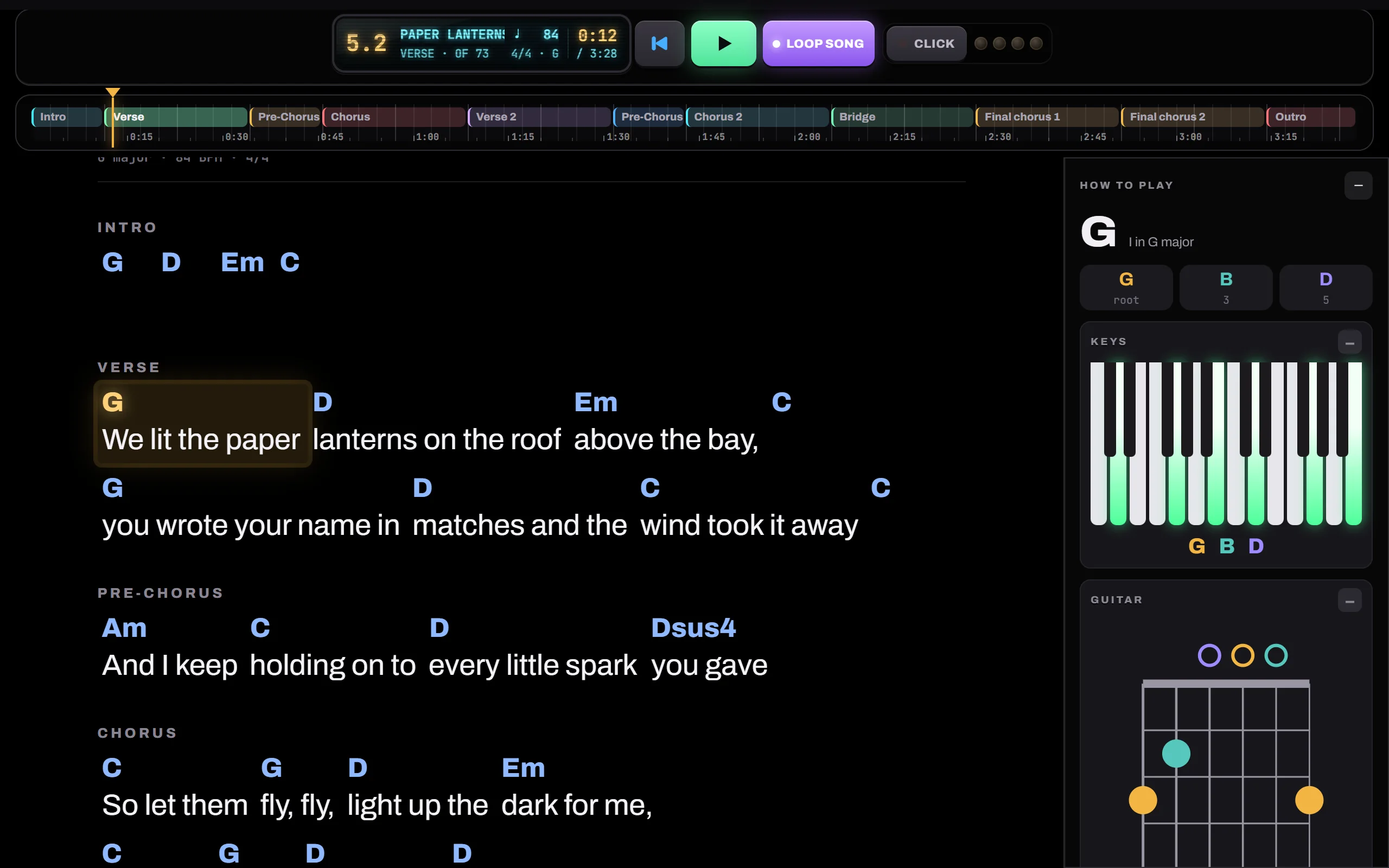
Keys, guitar, bass and drums follow your chords from the first tap. Choose how each part plays: held, pulsing, arpeggiated or strummed.

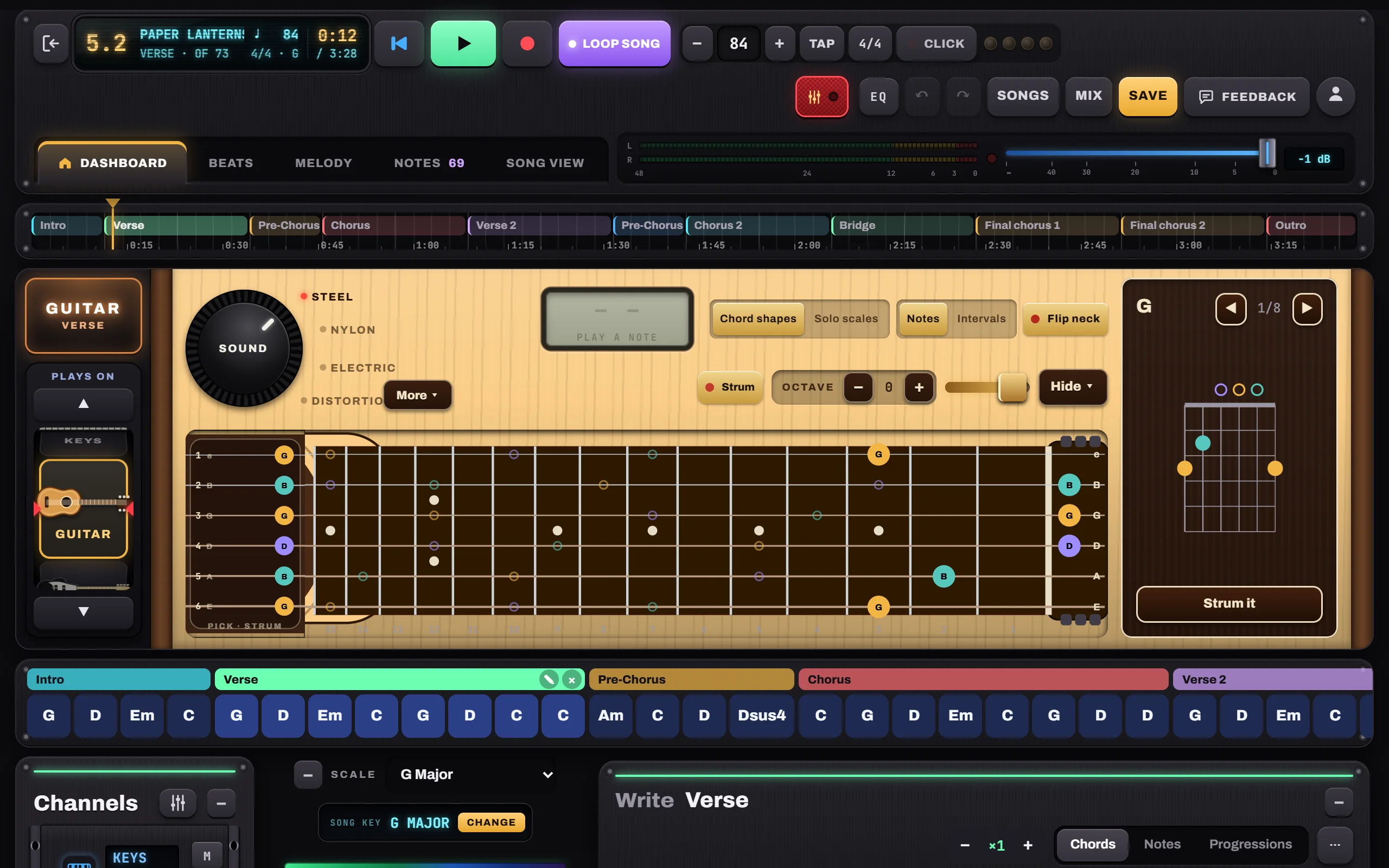
The guitar in Notes to Play: a real fretboard showing the G chord shape, the SOUND knob with Steel, Nylon, Electric and Distortion, and the chord box
Mix & Master

Then make it sound finished.

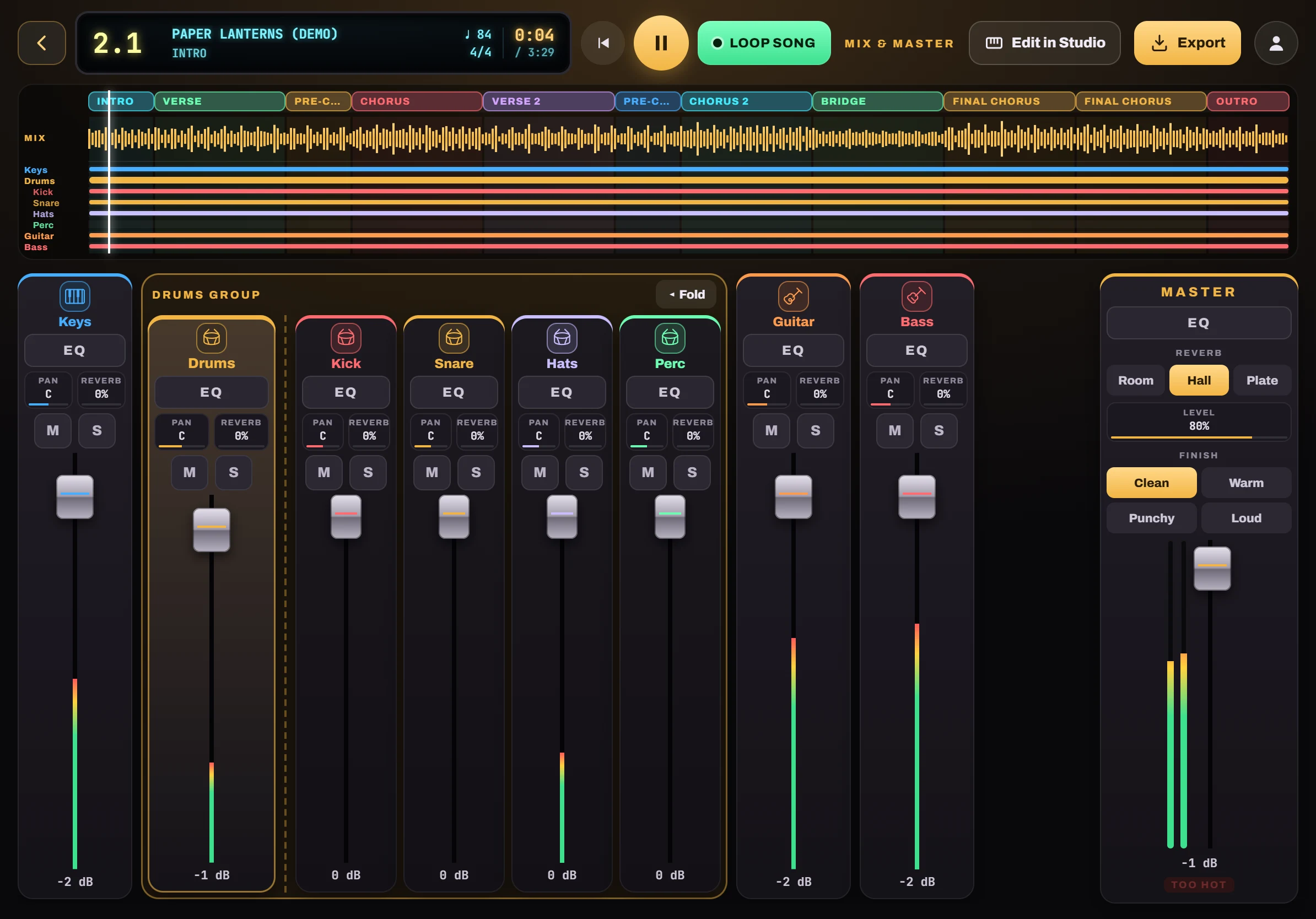
Every song opens in a second studio: a mixing desk with a fader per instrument, EQ, pan and reverb, and a master with a one-tap finish. Export it as a WAV or MP3.

Mix & Master in Notes to Play: the song timeline, channel strips with faders, the drums group and the Master with reverb and Finish
  • Drums as a group, with Kick, Snare, Hats and Perc
  • A full EQ on every channel
  • Room, Hall or Plate reverb
  • Finish: Clean, Warm, Punchy or Loud
  • Every part on one timeline
  • Export WAV or MP3

How to mix and export

Inside the studio
Keys

Grand piano to organ and pads. Every finger plays.

Keys screen in Notes to Play
Guitar

A real neck. Chord shapes, strumming, solo scales.

Guitar screen in Notes to Play
Beats

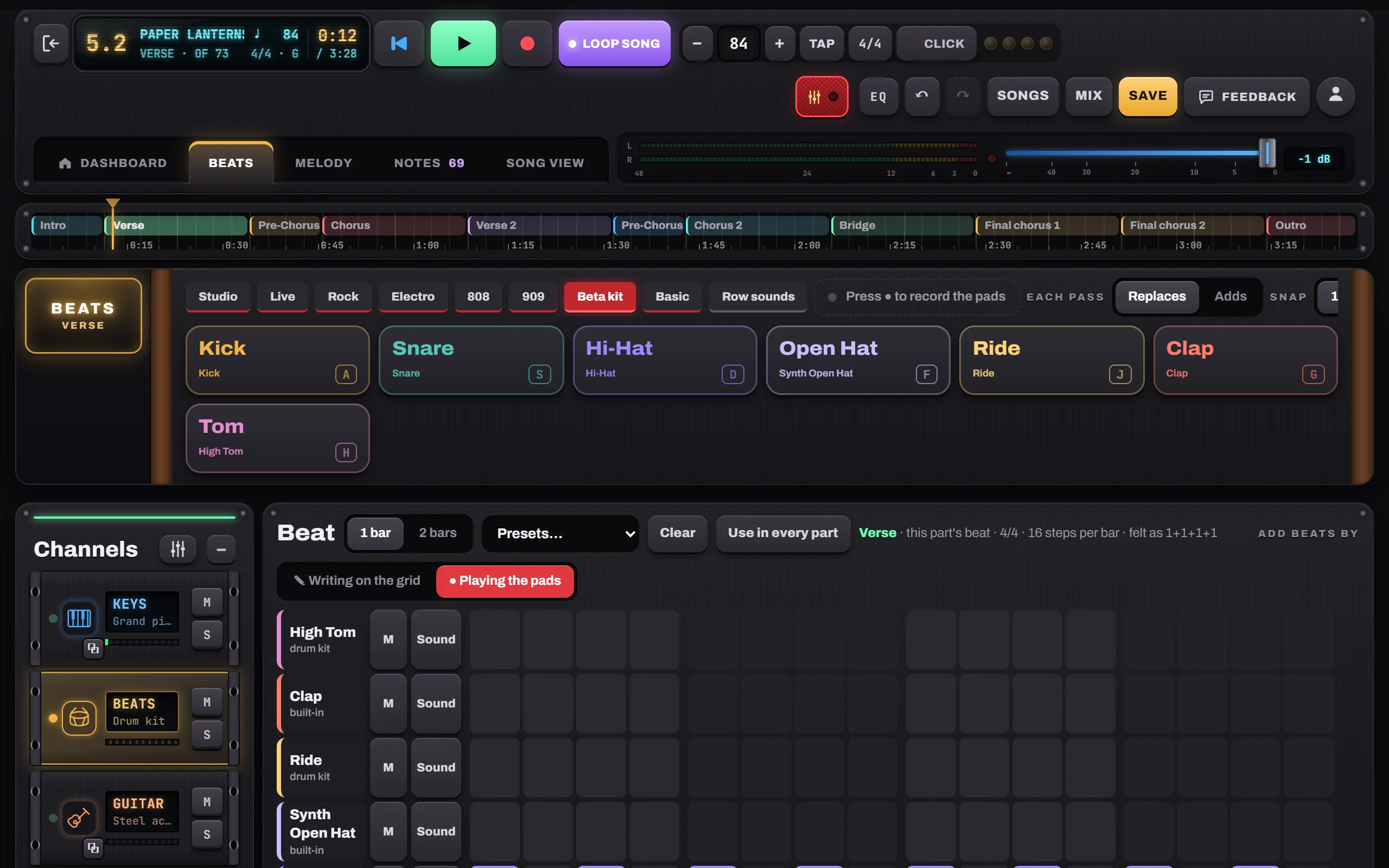
Pads, a step grid and a different beat for every part.

Beats screen in Notes to Play
Melody

A piano roll for every channel.

Melody screen in Notes to Play
Chord by chord

See every note. Give any chord its own pattern.

Chord by chord screen in Notes to Play
Lyrics

A lyric under every bar, with a rhyme finder.

Lyrics screen in Notes to Play
Mix & Master

Faders, EQ, reverb and a finish. Then export.

Mix & Master screen in Notes to Play
Concert

Full-screen chords and lyrics for the stage.

Concert screen in Notes to Play
How it works

From idea to finished song in six moves.

  1. Pick a keyTap a key on the circle. Its chords light up.
  2. Add chordsTap to hear, write the ones you love into bars.
  3. Choose how it playsHold, Pulse, Arp or Strum, part by part.
  4. Add beats and melodyPads, a beat per part, a piano roll.
  5. RecordLay down your voice or guitar over the band.
  6. Mix and exportFinish it in Mix & Master. Save a WAV or MP3.

Write your first song in 5 minutes

Made for wherever songs happen

On the couch. On the train. On stage.

Over the shoulder of a guitarist on a leather couch, playing along with the Notes to Play guitar screen on a tablet on the coffee table
Couch sessionsFind the chords, then let the band play them back.
A singer with headphones singing into a microphone at home, a tablet on a music stand in front of her
Sing over itRecord takes with headphones on.
A grey-bearded guitarist playing a café gig with a tablet clamped to his microphone stand
Café gigConcert mode keeps the words in view.
Over the shoulder of a songwriter playing a small MIDI keyboard, with the Notes to Play keyboard screen on a tablet in front of her
Bedroom studioPlug in a MIDI keyboard.
An older man in headphones writing lyrics on a park bench in autumn, a tablet on his knee
Anywhere, offlineNo signal needed.

Photos are illustrations of fictional musicians. Image credits

Sample songs

Made in Notes to Play. Press play.

Recorded straight from the app’s own playback. No editing, no extra plug-ins.

“Paper Lanterns” open in Notes to Play
Demo song · pop / folk

Paper Lanterns

G major84 BPM4/410 parts
0:33

The demo that ships with the app: ten parts, lyrics under every chord, ideas and a to-do. Open it from the Start screen.

“Velvet Hours” open in Notes to Play
R&B / neo-soul

Velvet Hours

D major86 BPM4/43 parts
0:25

Seventh and ninth chords on electric piano over a laid-back boom-bap groove.

“Gravel Road Waltz” open in Notes to Play
Folk / acoustic

Gravel Road Waltz

G major104 BPM3/44 parts
0:25

Three-four time, steel-string guitar strumming, and the Waltz beat. Campfire simple.

All sample songs

Early impressions

What songwriters will say.

Placeholder quotes for layout only. Real beta tester quotes will replace them.

Example
I finally finished a chorus I’d been humming for a year.
Example quoteSinger-songwriter (placeholder)
Example
The chord dial is like having a co-writer who never gets tired.
Example quoteGuitarist (placeholder)
Example
My students hear the circle of fifths instead of memorising it.
Example quoteMusic teacher (placeholder)
A music teacher showing three students a tablet beside an upright piano in a sunny classroom
Education

Theory you can hear.

The circle of fifths, numerals and real progressions, played back the moment students tap them.

For teachers and students

Yours, offline, private

Your songs never leave your device.

Works offline

After the first visit, the studio and every sound live on your device. No signal needed.

No account, no uploads

Songs and recordings are saved on your device. Export or share them when you choose.

No ads, no tracking

No analytics, no ad networks. Just you and the song.

Coming soon: sync with your own Dropbox, Google Drive or OneDrive, straight to your account, never through ours.

Your next song
starts with one chord.

Free to start. Installs from your browser in seconds.